
December 31, 2025
Updates
December Updates: Faster Quotes, Clearer Flights, Smarter Proposals for Travel Agencies
A month focused on speed and clarity for travel agencies
If you run a travel agency, you know your travel agency workspace needs to help you sell faster, keep operations organized, and build confidence with every proposal. That’s exactly what we focused on in December: improvements that reduce clicks, avoid confusion, and put the right information where you need it.
Everything you’ll see below is designed from the day-to-day reality of agency owners in mind: less friction for your team, more clarity for passengers, and better response rates on proposals.

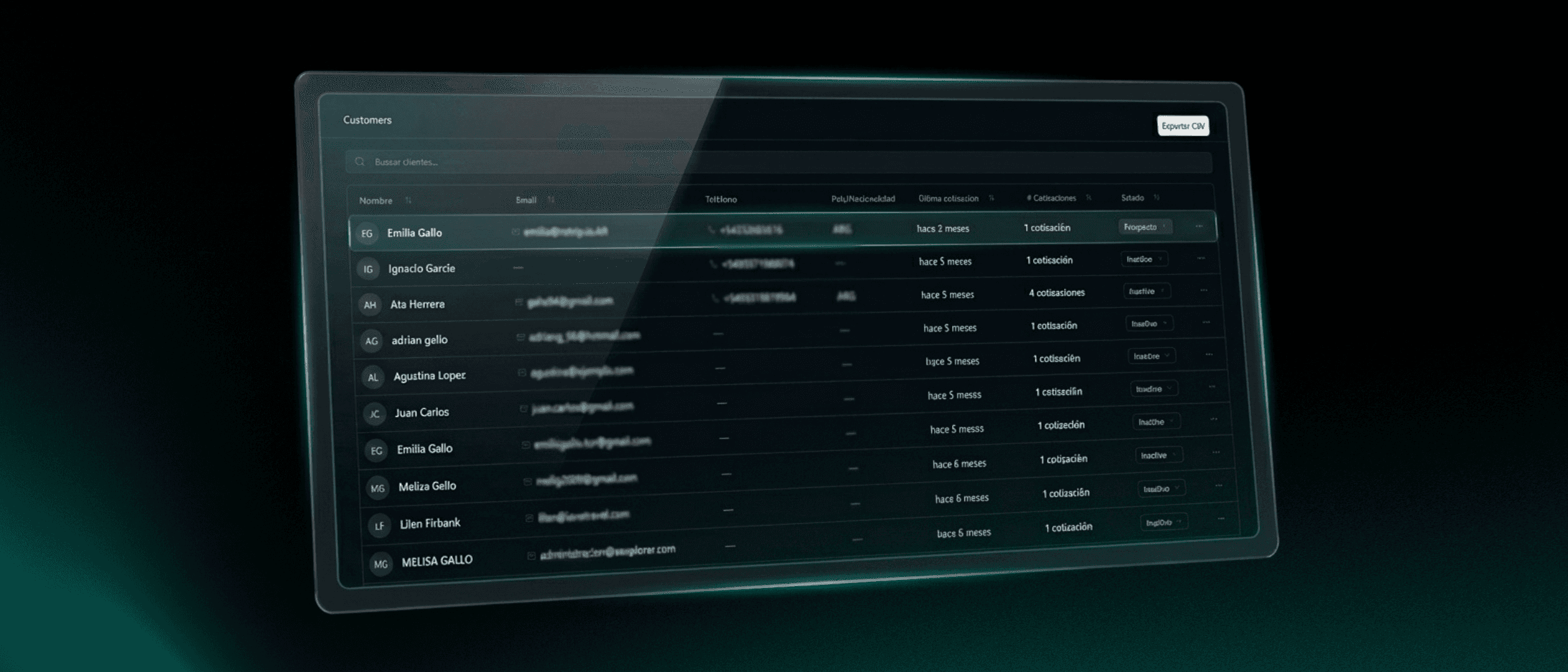
Renewed client panel: all passenger data, opportunities, and commercial activity in one place.
Private notes and files: add internal comments and attachments to quotes without affecting what the passenger sees.
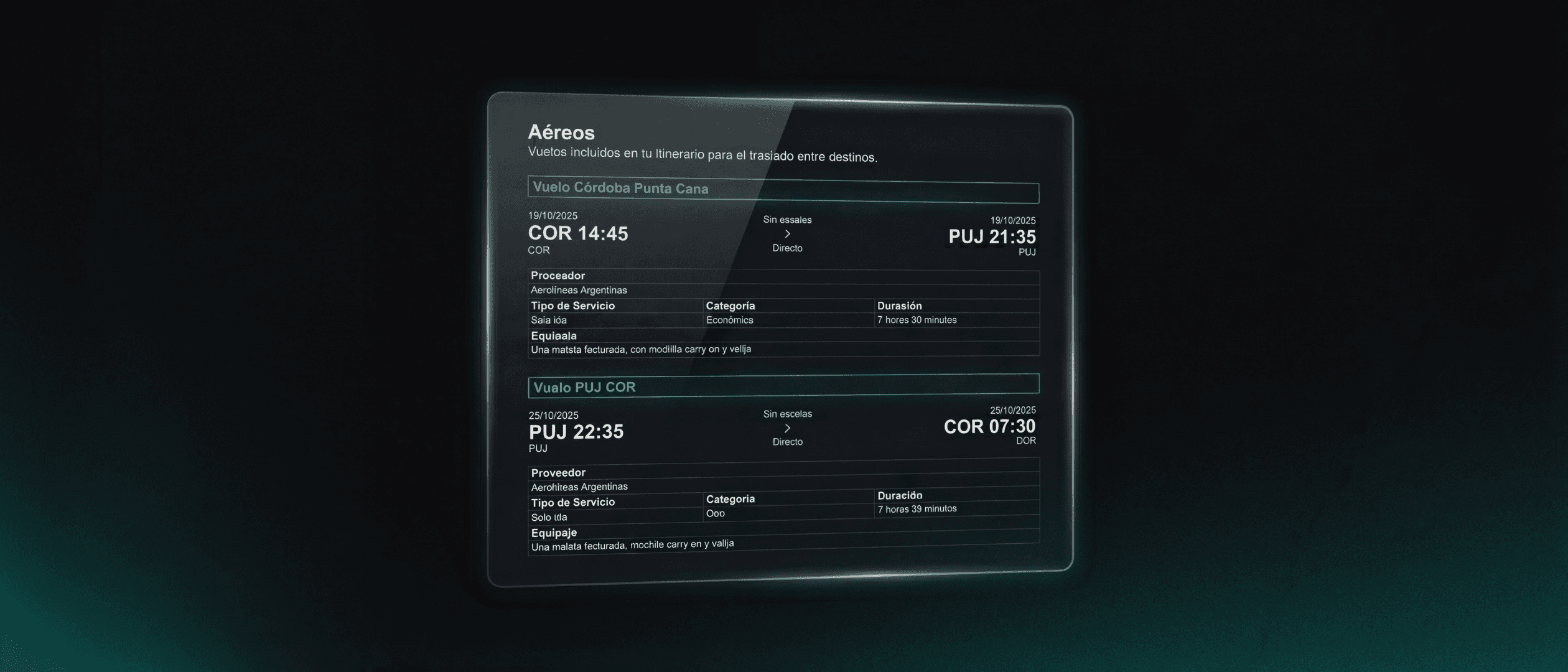
Flights at the top of the proposal: option to show outbound and return flights first, just as clients expect.
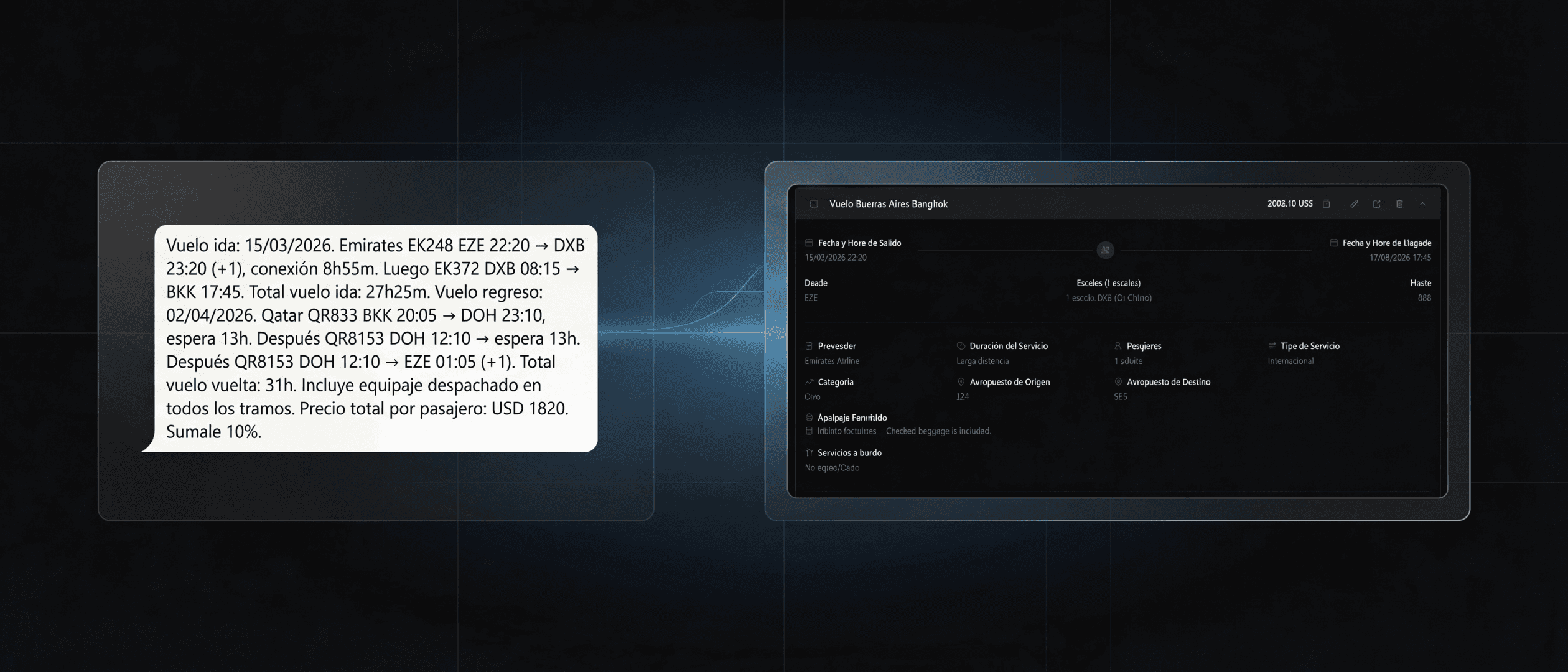
AI that understands multi-stop flights: multi-leg flights are now grouped as a single option, with segments and layover times clearly ordered.
Hotel and activity links in the PDF: the accommodation title is clickable and links to the official website, without adding visual noise.
Overall polish: improved PDF stability, date selection, service editing, and quote reassignment to reduce rework.
What’s new in your travel agency workspace
Renewed client panel with a 360° view of customers, history, and opportunities.
Private notes and internal attachments per quote.
Optional display of outbound and return flights at the top of the proposal.
Improved interpretation of multi-stop flights in the AI quoting agent.
Official hotel or activity website linked directly from the title in the PDF.
Experience and stability fixes (PDFs, calendars, editing, and reassignment).
Renewed client panel: the full relationship in one place
What changed?
The client panel was updated so you can see passenger data, open opportunities, sent proposals, tasks, and recent activity all on a single screen. Navigation is clearer, and frequent actions (create a new quote, call, send WhatsApp or email) are always one click away.
Why does it matter for a travel agency?
Because the business lives in the details: who requested what, when the last interaction happened, how much revenue is at stake, and what the next step is. An incomplete client view forces teams to jump between spreadsheets, email threads, and chats, slowing down follow-up.
What operational problem does it solve?
Information scattered: each advisor organized data differently.
Lack of conversation context: hard to know what was sent before.
Late follow-ups: without visibility, opportunities fall through the cracks.
Impact on speed, order, and conversion
Speed: fewer system jumps mean faster responses.
Order: a clear client history avoids duplicates and confusion.
Conversion: better follow-up timing increases proposal response rates.
Practical example
Lucía runs an agency with six advisors. Before, each advisor kept their own files. Now, when she opens the client panel, Lucía can see which opportunities are “In negotiation,” which proposals expire this week, and which passengers haven’t replied in 48 hours. With that visibility, she organizes a one-hour follow-up push and recovers two deals that were going cold.

Private notes and files: internal conversations without client noise
What changed?
You can now add private notes and attach internal files to each quote (for example, operator conditions, screenshots, provisional vouchers). These notes are not visible to the client; they’re for your team only.
Why does it matter?
Agencies work as a team: one advisor may start a proposal and another may close it. Without an internal space, information gets lost in chats. Private notes provide context like: “Passenger is vegetarian,” “Prefers window seat,” or “Concerned about the layover in GRU.”
What operational problem does it solve?
Disorganized WhatsApp exchanges.
Lost evidence and supplier agreements.
Uncertainty when covering vacations or team absences.
Impact
Speed: the next advisor understands everything without asking for a recap.
Order: documentation lives in one place, tied to the proposal.
Conversion: better passenger experience by remembering preferences.
Quick best practices
Use prefixes by area:
[Provider],[Post-Sales],[Docs].Always attach fare conditions and deadlines.
Leave a clear “next step” at the end of each note.
Flights at the top of the proposal: show what matters first
What changed?
You now have the option to show outbound and return flights at the very top of the quote. Many passengers want to see schedules and connections first before deciding.
Why does it matter?
The client’s brain looks for certainty: “Do I arrive during the day?”, “How long is the trip?”, “How long is the layover?”. When flights appear at the end, some clients don’t read further or ask for a new PDF “just with the flights.”
What operational problem does it solve?
Resending the same proposal with a different order.
Calls to confirm flight details already included.
Lost focus in the sales conversation.
Impact
Speed: fewer back-and-forth messages.
Order: consistent proposal structure.
Conversion: once flight doubts are cleared, decisions move forward.
Tips for agencies
If you sell corporate travel, enable this view by default.
For leisure travel with families, combine flights at the top with a hotel and activities summary right below.
AI that understands multi-stop flights: one option, fully clear
What changed?
The AI quoting agent now correctly interprets multi-stop flights and groups them into a single service, with segments and layover durations shown in order. It no longer splits the same itinerary into multiple “options” that confused both advisors and passengers.
Why does it matter for agencies?
Many routes in LATAM and to Europe or the US involve two or three segments. When proposals show these as separate flights, clients struggle to understand the itinerary and agencies lose credibility.
What operational problem does it solve?
PDFs with duplicated or poorly grouped segments.
Confusion between real options and segments of the same ticket.
Time wasted manually fixing what the AI split incorrectly.
Impact
Speed: paste flight text and the AI builds a coherent block.
Order: the itinerary is understandable at a glance.
Conversion: fewer “is this one flight or three?” questions, more focus on closing.
How it works in practice (common examples)
Outbound with two international layovers (COR–MIA): one service showing Segment 1 COR→AEP, Layover in AEP (2h10), Segment 2 AEP→GRU, Layover in GRU (1h30), Segment 3 GRU→MIA.
Multi-stop outbound + direct return (EZE–BCN–EZE): two services: one for the outbound with stops, one for the direct return.
Internal connection (SCL–CUS): grouped as a single service if part of the same itinerary.
Edge case – separate tickets on the same day: if marked as “Ticket 1 / Ticket 2,” the AI keeps them as separate services.
Tips for best results
Indicate Outbound / Return / Connection at the start.
Use Ticket 1 / Ticket 2 when they are separate bookings.
Add layover durations when available.
Paste times and airport codes on separate lines.
Clickable hotel (and activity) links in the PDF
What changed?
You can now associate the official website of an accommodation (and activities) with each item. In the PDF, the hotel title becomes a clickable link. If no website is added, it displays as plain text as before.
Why does it matter?
Passengers often want to validate photos, amenities, and the hotel concept directly from the proposal. Before, they had to search on their own. Now, you build trust without adding extra visual elements.
What operational problem does it solve?
Time wasted answering “Do you have the hotel website?”
Clients opening Google, getting distracted, and coming back weeks later.
Overloaded PDFs with pasted URLs in the wrong places.
Impact
Speed: fewer follow-up messages.
Order: the PDF layout stays clean; only the title is linked.
Conversion: easier validation leads to faster decisions.
How to use it
At the accommodation level, add the optional “Hotel website” field. Save, and the title becomes clickable in the PDF. No extra rows or columns; the layout stays clean and consistent.
Overall polish: less friction, more confidence
What changed?
December also included a round of fixes to make daily use more reliable, including:
PDF stability: agency data and signatures render correctly, no overlapping titles or prices, and better integration of services like buses, trains, and cruises.
Date selection: prevents past dates and fixes calendar inconsistencies.
Editing and reassignment: fewer errors when editing services or reassigning quotes between advisors.
Why does it matter?
Every small issue slows teams down and affects client trust. A stable tool builds confidence, helps teams move faster, and transmits that confidence in every proposal.
Impact
Less rework fixing PDFs.
Fewer internal doubts when reassigning opportunities.
More focus on selling, not fighting the tool.
Who are these updates for?
Small and mid-sized agencies that need simple but powerful travel agency software.
Sales teams of 3–15 advisors sharing context daily.
B2B boutique operators that value clean, consistent proposals.
Owners focused on response time and conversion metrics.
Executive summary for agency owners
You can now:
Respond faster with better context.
Avoid confusion with clearly explained multi-stop flights.
Build trust instantly with official hotel and activity links.
Keep order without cluttering the PDF.
Sell more by showing what clients care about first: flights.
Frequently Asked Questions (FAQ)
1) Do I need to train my team to use these updates?
No. These improvements work out of the box. A short internal alignment on templates and notes is enough.
2) Do hotel links change the PDF design?
No. The layout stays the same. Only the hotel title becomes clickable when a website is added.
3) What happens if a flight has two separate tickets on the same day?
If marked as “Ticket 1 / Ticket 2,” the AI keeps them as separate services.
4) Can I choose when to show flights at the top?
Yes. It’s configurable. Many agencies use it by default for corporate and family travel.
5) Does this include direct supplier connections?
No. The current focus is on commercial workflow: faster quotes, follow-up, visibility, and metrics. Direct supplier connections are not part of the product yet.